The NINE09 Connect app brings your NINE09 eBike's smart features together in one place. It connects your phone to your eRide through Bluetooth, so you can locate your bike, lock and unlock it, check battery and range, follow navigation on the handlebar display, track journeys and share access with other riders. See every feature in action on the NINE09 Connect page.
The app is free on the Apple App Store and Google Play.
If you have a NINE09 CX01 or CX02, start by pairing your bike with the app. Then turn on Find My Bike, set up your security settings and check that navigation, battery monitoring and rider profiles work. Doing this before your first regular commute means you get the full benefit from day one.
What Is the NINE09 Connect App?
NINE09 Connect is the companion app for connected NINE09 eRides. It talks to your eBike through Bluetooth Low Energy (BLE), so you can control key features while your phone stays in your pocket.
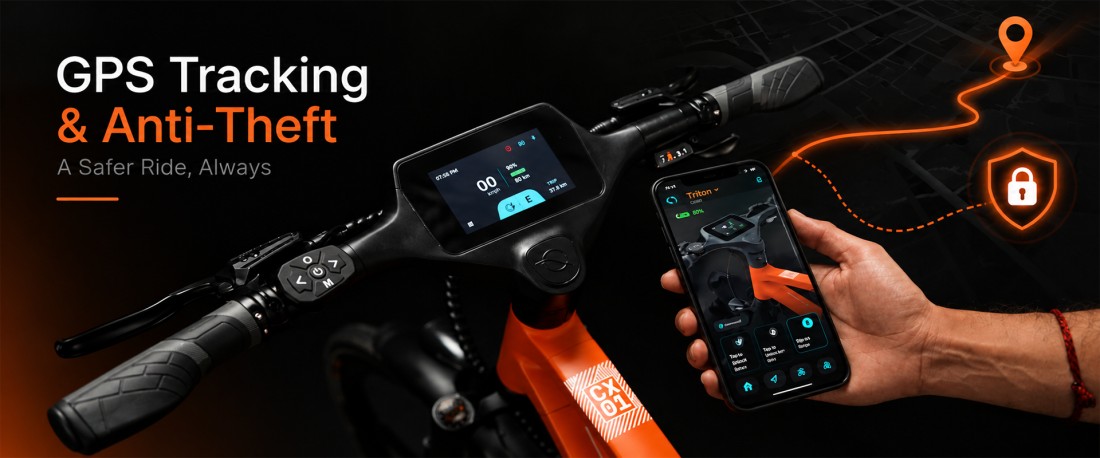
On the NINE09 CX01 and CX02, the app works with the integrated 4.3-inch LCD touchscreen. Navigation directions, incoming call prompts and essential ride information appear on the handlebar display.
The app covers six areas:
- Security: Find My Bike, motion alerts and remote lock and unlock.
- Navigation: Turn-by-turn directions on the eBike display.
- Battery management: Battery status, estimated range and remote battery unlock.
- Ride tracking: Distance, duration, average speed and route history.
- Shared access: Multiple rider profiles and support for more than one eRide.
- Maintenance and updates: Functional notifications, bike health information and over-the-air (OTA) software updates.
Feature availability can depend on your eBike model, software and app version.
How to Set Up NINE09 Connect
Follow these steps before your first longer ride.
Download the app
Choose the right store for your phone:
Download on the App Store – iPhone
Get it on Google Play – Android
The iPhone app requires iOS 16.0 or later. Android users should check the Google Play listing for current compatibility.
Sign in or create an account
Open the app and follow the on-screen steps to sign in or create your account.
Turn on Bluetooth
Switch on Bluetooth on your phone. Bluetooth Low Energy is how the app and your eBike exchange information and commands.
Grant the required permissions
Allow the permissions the app asks for, such as Bluetooth and location. Location powers navigation and Find My Bike, and the app may use it even when it is not open, depending on your phone settings.
Pair your eBike
Keep your phone close to your eBike, switch the bike on and follow the pairing steps in the app. Once connected, check that the bike appears in the app and the controls respond.
Personalise your settings
Choose your display theme, brightness, and measurement units. If other people will ride the same eBike, set up their rider profiles too.
Check for software updates
Check whether an app or eBike firmware update is available. Install it as shown on screen, and do not interrupt a firmware update while it is running.
NINE09 Connect Features briefly
Find My Bike, Motion Detection and Remote Lock
Security is one of the most practical reasons to set up NINE09 Connect before your first commute.
Find My Bikeleverages the eBike’s built-in GPS to display its real-time location on a map. This feature helps users quickly locate their bike in large parking areas, near busy transit stations, or whenever they need assistance remembering where it was parked.
Use Cases:
- Easily locate your eBike in crowded parking lots, malls, offices, or transit stations.
- Receive instant alerts if someone moves your parked bike without permission.
- Remotely secure the bike when you forget to lock it before leaving.
- Monitor your bike's location while it is parked at a public place.
- Add an extra layer of security during daily commuting and travel.
Motion Detection alerts you when your parked bike is moved unexpectedly. Remote lock and unlock lets you secure the eBike from your phone. Together, these let you keep an eye on your bike and act quickly when something looks wrong.
GPS tracking does not physically stop theft or guarantee recovery. Always use a good physical lock and choose secure parking wherever you can.
Read our guide to GPS tracking and eBike anti-theft protection to see how tracking, detection and prevention work together.
Use Cases:
- Sends alerts when a parked eBike is moved unexpectedly.
- Helps monitor your bike when parked outside an office, café, or shop.
- Allows you to react quickly to suspicious movement.
- Useful when leaving your bike in public parking areas.
Turn-by-Turn Navigation on the eBike Display
NINE09 Connect sends navigation directions to the handlebar display, so you do not need to keep checking a phone on your handlebars.
Search your destination, start the route, and follow the directions on screen. Bike-friendly routes with dedicated bike lanes are offered where available, depending on mapping data.
Navigation helps you explore new streets, find suitable routes, and see your estimated arrival time without looking down at your phone.
Check that the route is loaded before you set off. Stop somewhere safe before changing destinations.
Use cases:
- Displays navigation directions on the handlebar screen.
- Helps riders confidently navigate unfamiliar routes.
- Reduces the need to check a phone while riding.
- Useful for discovering new commuting routes.
- Makes city exploration and weekend rides more convenient.
Call Management While Riding
When a call comes in, the call controls appear on the eBike screen. You can accept, decline, or mute it without taking your phone out of your pocket.
This is handy for everyday commuting, but it should not become a distraction. Keep your attention on traffic and pull over somewhere safe for any conversation that needs more than a quick reply.
Use Cases:
- Let's you accept, decline, or mute incoming calls from the display.
- Helps riders stay connected while keeping their phone in their pocket.
- Useful for receiving important calls during daily commutes.
- Minimizes distractions by providing quick call controls.
- Supports safer handling of incoming calls while riding.
Battery Status, Range Monitoring and Remote Battery Unlock
NINE09 Connect shows your battery status and estimated remaining range, so you can check if you have enough charge before and during a ride.
Estimated range is not a guarantee. How far you can go depends on:
- Rider and cargo weight.
- Terrain, gradients, and wind.
- Temperature and tyre pressure.
- Pedal-assist mode and riding style.
- Battery condition and charging history.
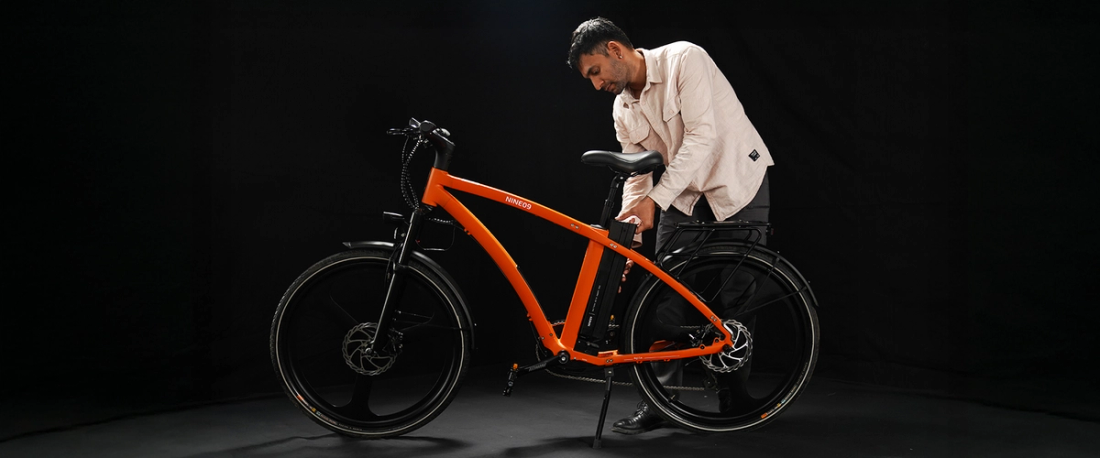
The NINE09 CX01 and CX02 use a swappable 374Wh battery with a Smart Battery Management System (Smart BMS) that monitors battery health. Remote Battery Unlock releases the battery from the app, ready to remove and charge.
This is especially useful when you cannot charge the whole eBike where it is parked. Take the battery to a suitable indoor charging spot instead.
For more on battery capacity, charging and what affects range, read the NINE09 electric bike battery guide.
Use cases:
- Records of distance, duration, average speed, and route information.
- Helps riders understand their commuting patterns.
- Useful for comparing different routes and travel times.
- Tracks riding activity over days, weeks, and months.
- Provides insights into battery consumption habits
Ride History: Understand Your Daily Commute
Ride History records distance, duration and average speed for every journey, and shows your route on a map.
Over time, this shows your real commuting habits instead of guessing. You can see how far you usually ride each day, compare alternative routes, and see how your regular journeys affect battery use. That helps you plan charging around your actual routine.
A quick look at your ride history at the end of each week is an easy way to get to know your eBike.
Use Cases:
- Track daily, weekly, and monthly riding distances.
- Compare multiple commuting routes based on travel patterns.
- Monitor riding habits and overall eBike usage.
- Estimate battery consumption across frequent journeys.
- Maintain a record of rides for personal fitness or travel insights.
Multi-User Access and Multi-Ride Support
NINE09 Connect makes it easy when more than one person rides.
Multi-User Access gives each rider their own profile, so everyone keeps their own preferences and journeys.
Multi-Ride Support lets you manage more than one NINE09 eRide in the same app. Someone who owns both a NINE09 CX01 and a CX02 can manage both eBikes from one phone.
If you share your bike with family or a partner, set up a profile for each rider and check they can use the features they need.
Use Cases:
- Allow family members to share a single eBike with personalized settings.
- Manage separate rider profiles for household users.
- Switch between multiple NINE09 eBikes from one account.
- Maintain individual ride histories for different riders.
- Simplify eBike management for families, couples, or fleet owners.
Notifications, Bike Health and OTA Updates
NINE09 Connect tells you when you're eBike needs attention.
Notifications describe the issue and suggest the next step. Bike health information helps you understand when further checks may be needed.
Over-the-air (OTA) updates bring software improvements to your eBike through the app, without a trip to a service centre.
Keeping the app and eBike software up to date improves compatibility and fixes known issues. Follow the update instructions, make sure the battery has enough charge and do not switch the system off during a firmware update.
If a warning stays after you follow the suggested fix, contact NINE09 support rather than ignoring it.
Use Cases:
- Receive alerts about potential issues before they affect rides.
- Stay informed about firmware improvements and new features.
- Monitor the overall health of your eBike remotely.
- Reduce service visits through wireless software updates.
- Keep the eBike optimized with the latest performance enhancements and fixes.
NINE09 Connect Setup Checklist for New Owners
Use this checklist to cover the important features in your first week.
- Pair your eBike and confirm it appears in the app.
- Open Find My Bike and check the bike's location shows.
- Turn on motion alerts and test remote lock and unlock.
- Add profiles for any other riders.
- Set your display theme, brightness and measurement units.
- Try navigation on a familiar route before relying on it somewhere new.
- Check battery status and estimated range before a longer journey.
- Try Remote Battery Unlock and charge the battery indoors.
- Review Ride History after a few journeys.
- Check for app and eBike software updates.
You do not need to change every setting at once. Start with pairing, security and battery, then explore the rest as you get familiar with the system.
Privacy and App Permissions
NINE09 Connect uses permissions for Bluetooth, navigation, and location features.
Before granting access, review each permission request on your phone and think about which features you plan to use. You can also check the app store listings and the NINE09 Privacy Policy.
The Apple App Store privacy label and the Google Play Data safety section describe the developer's reported data practices. These can change, so check the latest version in your app store.
Troubleshooting: When NINE09 Connect Will Not Work
If the app will not connect to your eBike or a feature does not respond, start with these checks.
- Check Bluetooth and power: Make sure Bluetooth is on, your eBike is switched on and your phone is close to the bike.
- Update the app: Install the latest version from your app store. Updates often fix compatibility and connection problems.
- Review permissions: Confirm the app has the access it needs for the feature you are using.
- Reconnect the bike: Follow the reconnection steps in the app. Avoid removing saved connections unless the instructions tell you to.
- Follow in-app alerts: If the app shows an error with a suggested fix, try that first.
The Google Play release notes include a Bluetooth fix for Android 15. If you use Android 15 and have connection issues, update the app first.
If the problem continues, email support@nine09ev.com or reach the team through Contact Us.
Get More from Your NINE09 eRide
NINE09 Connect brings security, navigation, battery information, ride history and shared access together in one app. Spend a few minutes on setup, check the core features work and keep the software updated. After that, the app quietly does its job on every commute.
Still choosing your eBike? Explore the NINE09 CX01 Step Over eBike and the NINE09 CX02 Step Through eBike to compare frame designs and find the one that suits the way you ride.
Ride smarter, worry less. Download NINE09 Connect for iPhone or Android, pair your eBike and set up your security features before your next ride.
Download the NINE09 App: Download for iPhone (App Store) | Download for Android (Google Play)
FAQs
Is the NINE09 Connect app free?
Yes, NINE09 Connect is free to download from the Apple App Store and Google Play. It provides connected features for NINE09 eRides, including the CX01 and CX02 eBikes.
Which phones are compatible with NINE09 Connect?
The app is available for iPhone and Android. The iPhone app requires iOS 16.0 or later. Android users should check Google Play for the latest compatibility requirements.
Can I ride my NINE09 eBike without the app?
Yes, You can ride using the eBike's handlebar controls without opening the app. Connected features such as GPS tracking, remote lock and unlock, remote battery unlock, ride history and OTA updates need the NINE09 Connect app.
How does Find My Bike work?
Find My Bike uses the eBike's built-in GPS to show its location on a map in the app. It helps you find a parked bike and gives you location information if the bike is moved without permission. Use it alongside a physical lock, not instead of one.
Can multiple people use the same NINE09 eBike?
Yes. Multi-User Access gives each rider their own profile on the same eBike. It suits couples, families and other households that share a bike.
How do I update my NINE09 eBike software?
Check the NINE09 Connect app for an over-the-air (OTA) update and follow the on-screen steps. Keep your phone and eBike connected, and do not interrupt the update while it is running.